Is your Windows 10 lame?

Windows 10 is much better than older versions of its kind, but it is still the case that a tidy and well-maintained Windows is still faster. Regular tidying up and checks are therefore part of it, so that it is still fun to work with Windows.
By deleting Windows update files that are no longer required, you can free up space on the hard drive. And Windows 10 is updated very often ;-)
Therefore you should look in the folder every six months or after every major update of Windows 10 and delete the superfluous update files.
File corpses remain on the disk even after the operating system has been installed. (In the hidden subfolder Installer)

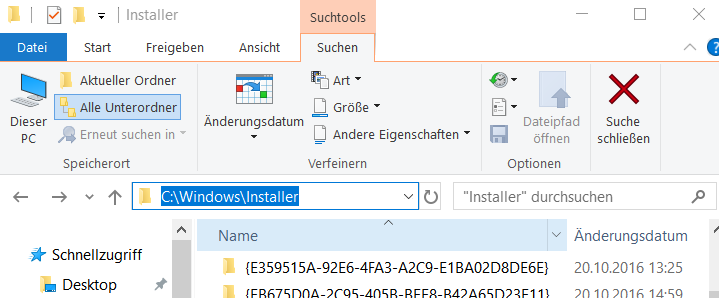
Make the installer folder visible
To do this, open Windows Explorer (Win key + e) on the View tab and check the box next to hidden elements. By ticking the box, the desired folder is visible under C: \ Windows.
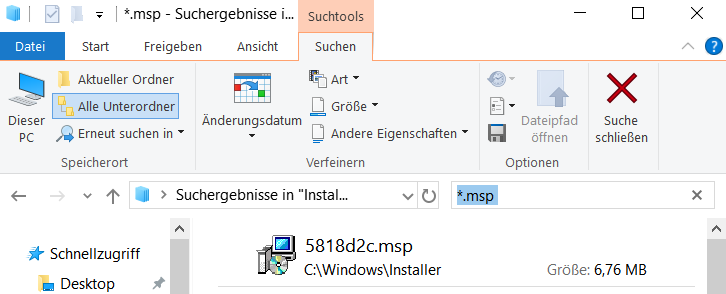
Windows update files .msp
Under no circumstances should you delete the installer folder or its contents! Other applications also store their update files there. Therefore, only delete the files with the .msp extension . Keep in mind that you will lose the ability to uninstall updates later, but this should only be done in an emergency.
Tip: To display only the desired files, simply enter *.msp in the search field.
You can make questions or comments under the following link.
Read / write comments
(ck)
| Transparency: | This article may contain affiliate links. These will take you directly to the provider. If you make a purchase through one of these links, we will receive a commission at no extra cost to you. These links help us to refinance the operation of win-tipps-tweaks.de. |
This tip comes from www.win-tipps-tweaks.de
© Copyright Michael Hille