Would you like under Windows 7 or others Windows versions little- in between the Screensavers start, this is after creating a specific shortcut with any shortcut possible. This function could possibly be used during a presentation or simply spontaneously at work at home.

To create such a shortcut on the desktop, first open Windows Explorer.
Here, type *.*scr into the search field in the upper right corner . This is the file extension used by screensavers in Windows.
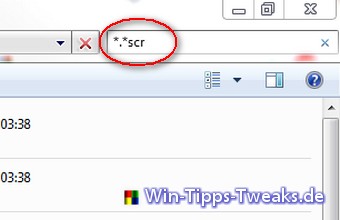
After a short wait, Explorer lists all found screensavers one below the other.
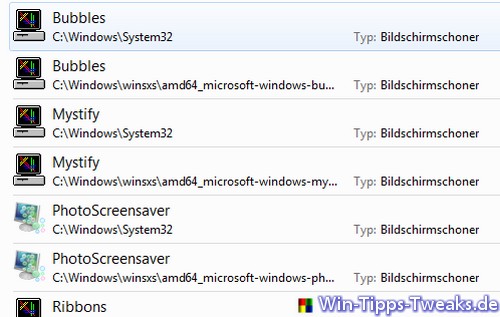
Double-clicking one of these .scr files would immediately start a screensaver . However, to make it even more convenient, you can now create a shortcut to any screensaver on your desktop.
Right -click on a saver and select " Create shortcut" from the context menu.
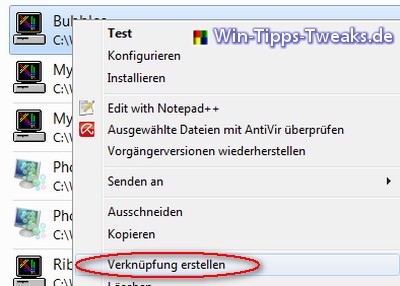
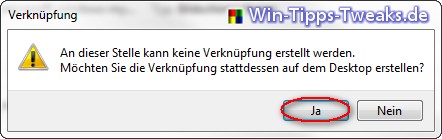
Windows then displays a message stating that a shortcut cannot be created at this location. However, if you confirm with "Yes ," a shortcut is created on the desktop.
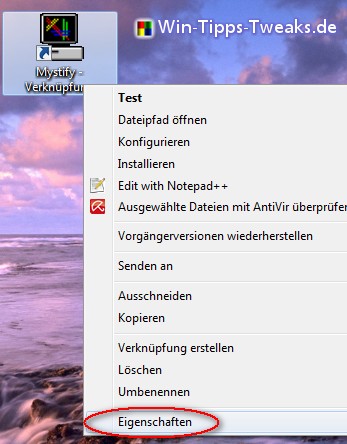
Right -clicking this shortcut opens its properties.
Under the Shortcut tab, you 'll find the Shortcut key field . Clicking there allows you to, for example, press the B key to set a keyboard shortcut to start the screensaver.
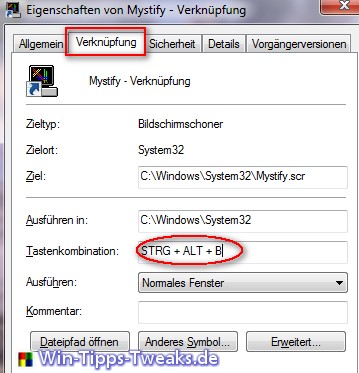
Clicking the OK button closes the window . Pressing Ctrl + Alt + B now starts the screensaver.

Other interesting tips:
- Windows 8 Keyboard Shortcuts - Useful Hotkeys
- More useful keyboard shortcuts and tricks in Windows 8
| Transparency: | This article may contain affiliate links. These will take you directly to the provider. If you make a purchase through one of these links, we will receive a commission at no extra cost to you. These links help us to refinance the operation of win-tipps-tweaks.de. |
This tip comes from www.win-tipps-tweaks.de
© Copyright Michael Hille