 Always looking to optimize Windows 7, I have another tip for you. Many Windows computers in Germany have a free or paid antivirus program installed, but most of them do not know which malware program the antivirus program protects against. The often installed free applications already protect well against spyware. You can find out which antivirus programs are popular with our readers in our survey. What kind of antivirus do you use? On the following website, Microsoft describes how to use Windows Defender to combat spyware in particular. - Windows Defender - The detection and removal of spyware will be better with Windows Defender according to Microsoft. The question of whether Windows Defender is really better remains open! The de facto is that two pest control programs are unnecessary and only slow down the system.
Windows Defender is automatically enabled and pre-installed by Microsoft. To free up system resources, you can disable Windows Defender as follows.
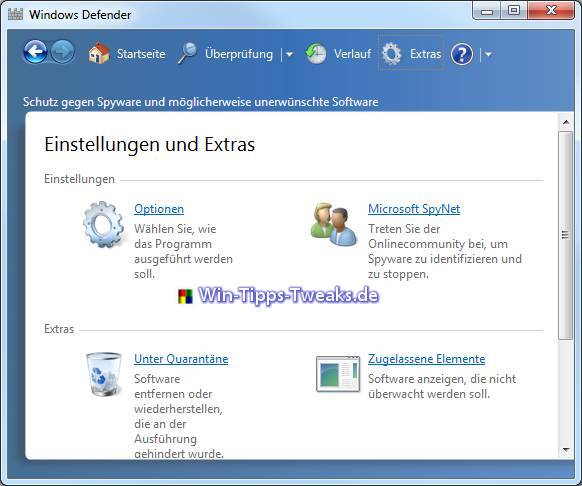
Start> Windows Defender and Enter
In the Windows Defender window click on Tools and then on Options.
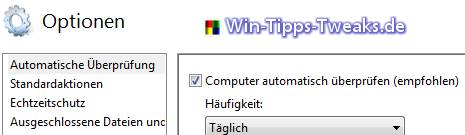
Remove the following tick in the options.
Automatic check on computer (recommended)
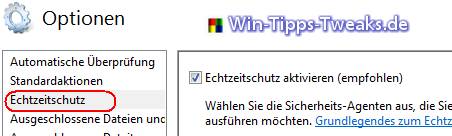
Enable real-time protection (recommended)
Administrator when using this program
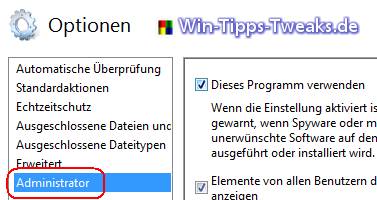
You should only deactivate Windows Defender if you have installed other appropriate programs, such as Avira AntiVirus.

To optimize Windows 7, I recommend the following tips:
- Top 10 -
Optimize Windows 7 servicesWindows 7 startup programs
Shut down Windows 7 faster
Set Windows 7 User Account Control
Windows 7 users automatically log in
More security with Windows 7 AppLocker
Windows 7 Ready Boost system requirements and usage
Windows 7 switch off unnecessary programs

| Transparency: | This article may contain affiliate links. These will take you directly to the provider. If you make a purchase through one of these links, we will receive a commission at no extra cost to you. These links help us to refinance the operation of win-tipps-tweaks.de. |
This tip comes from www.win-tipps-tweaks.de
© Copyright Michael Hille